Welcome to Day 12 of the React Native Advent Calendar!
Today we’re tackling folder structure - the foundation of every scalable app. A good structure makes your codebase easy to navigate, collaborate on, and maintain as it grows.
Why Folder Structure Matters
Ever opened a project and couldn’t find anything? Spent 10 minutes hunting for a component? That’s the pain of poor organization.
A clean folder structure:
- Makes onboarding new developers instant
- Reduces cognitive load (you know exactly where things go)
- Scales from MVP to enterprise without restructuring
- Prevents “route confusion” with Expo Router
Why this matters: Your folder structure is like the table of contents of a book. Good organization = faster development.
The Golden Rule: Separation of Concerns
Here’s the #1 principle for Expo/React Native projects:
The app/ folder is ONLY for routes (screens). Everything else lives outside.
Why? Because Expo Router treats every file in app/ as a potential route. If you mix components, hooks, and screens together, chaos ensues.
The Recommended Structure
Here’s a battle-tested folder structure that scales beautifully:
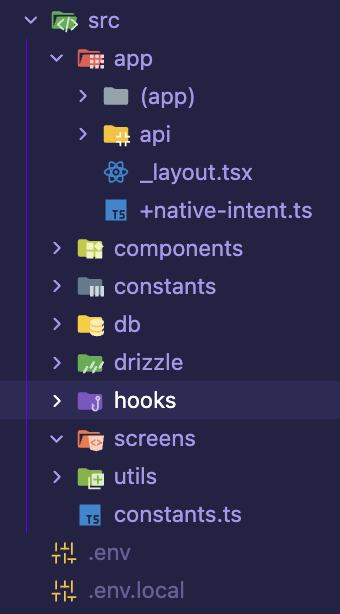
Let’s break down each folder and understand why it exists.
Folder Breakdown
app/ - Routes Only
What goes here: Screens and navigation structure.
What does NOT go here: Reusable components, hooks, utils, or business logic.
app/
├── (app)/           # App group (tabs, authenticated screens)
├── api/             # API routes (server endpoints)
├── _layout.tsx      # Root layout
└── +native-intent.ts # Deep linking configWhy: Expo Router uses file-based routing. Every file in app/ becomes a route. Keep it clean and navigable.
components/ - Reusable UI
What goes here: Reusable UI elements like buttons, cards, headers, modals.
components/
├── Button.tsx
├── Card.tsx
├── Header.tsx
└── Modal.tsxWhy: Components are the building blocks. Separate them so you can reuse them across multiple screens without duplication.
Pro tip: Organize by feature if your app is large:
components/
├── auth/
│   ├── LoginButton.tsx
│   └── SignupForm.tsx
└── products/
    ├── ProductCard.tsx
    └── ProductList.tsx
hooks/ - Custom React Hooks
What goes here: Custom hooks for logic separation, state management, and side effects.
hooks/
├── useAuth.ts
├── useApi.ts
└── useTheme.tsWhy: Hooks extract stateful logic from components, making them testable and reusable.
constants/ - App-Wide Values
What goes here: Colors, spacing, API URLs, config values.
constants/
├── Colors.ts
├── Sizes.ts
└── Config.tsWhy: Centralize values that never change. Makes theme updates and config changes trivial.
utils/ or services/ - Helper Functions
What goes here: Utility functions, API clients, formatters, validators.
utils/
├── api.ts           # API client
├── formatters.ts    # Date/number formatters
└── validators.ts    # Form validation

# OR organize by service:
services/
├── auth/
│   └── authService.ts
└── api/
└── apiClient.tsWhy: Pure functions that don’t depend on React. Easy to test and reuse.
db/ - Database Logic
What goes here: Database schemas, queries, and migrations (if using local DB like SQLite or Drizzle).
db/
├── schema.ts
├── queries.ts
└── migrations/Why: Separate data layer from UI. Makes database changes isolated.
The src/ Directory (Optional)
Some teams prefer wrapping everything in a src/ folder:
src/
├── app/           # Routes
├── components/    # UI components
├── hooks/         # Custom hooks
├── utils/         # Helpers
└── constants/ # ConstantsBenefits:
- Single entry point for all source code
- Separates code from config files (
package.json,app.json, etc.) - Cleaner root directory
Expo Router supports this! Just move app/ to src/app/ and it works.
Real-World Example
Here’s how a login screen would be organized:
app/
└── login.tsx              # The route/screen

components/
└── auth/
    ├── LoginForm.tsx      # Reusable form component
    └── SocialButtons.tsx  # Social login buttons

hooks/
└── useAuth.ts             # Authentication logic

utils/
└── validators.ts          # Email/password validation

constants/
└── Colors.ts              # Theme colors
The login screen (app/login.tsx) stays minimal:
import { LoginForm } from '@/components/auth/LoginForm';
import { useAuth } from '@/hooks/useAuth';

export default function LoginScreen() {
	const { signIn } = useAuth();

	return <LoginForm onSubmit={signIn} />;
}
Everything else is extracted and reusable!
Common Mistakes to Avoid
❌ Putting components in app/
app/
├── login.tsx
└── LoginButton.tsx # ❌ Expo Router sees this as a route!Fix: Move components outside app/.
❌ One giant utils/ file
utils/
└── helpers.ts # ❌ 2000 lines of random functionsFix: Split by purpose (formatters.ts, validators.ts, api.ts).
❌ No organization strategy
components/
├── Button.tsx
├── SuperButton.tsx
├── MyButton.tsx
└── TheButton.tsx # ❌ Which button do I use?Fix: Use clear, descriptive names. One Button.tsx with props for variants.
Pro Tips
1. Use Path Aliases
Set up import aliases to avoid ../../../ madness:
{
	"compilerOptions": {
		"baseUrl": ".",
		"paths": {
			"@/components/*": ["components/*"],
			"@/hooks/*": ["hooks/*"],
			"@/utils/*": ["utils/*"],
			"@/constants/*": ["constants/*"]
		}
	}
}
Now you can import like this:
import { LoginForm } from '@/components/auth/LoginForm'; // ✅ Clean!
// Instead of:
import { LoginForm } from '../../components/auth/LoginForm'; // ❌ Messy
2. Organize by Feature (Large Apps)
For bigger apps, organize by feature instead of type:
features/
├── auth/
│   ├── components/
│   ├── hooks/
│   └── utils/
└── products/
    ├── components/
    ├── hooks/
    └── utils/
Wrapping Up
A clean folder structure is the foundation of every great app. Start with good organization, and your codebase will thank you later.
Quick recap:
app/is for routes ONLY - Keep components, hooks, and utils outside- Separate by concern - components, hooks, constants, utils
- Use path aliases - Avoid
../../../imports - Stay consistent - Pick a structure and stick to it
- Scale gradually - Start simple, organize by feature when needed
Want to dive deeper?
Have a favorite folder structure? Share your setup on Twitter!
Tomorrow we’ll explore Day 13’s topic - see you then! 🎄